
User ID: S8BEalMLDI
Issue Description:
After deleting all my applications from the ClawCloud console, the dashboard still shows pods running. Currently: 1 healthy pod and 2 unhealthy pods.
Workspace Region:
ap-northeast-1
Steps to Reproduce:
- Navigate to ClawCloud console → Applications section
- Delete all existing applications (confirmed deletion)
- Refresh the dashboard page multiple times
- Expected result: 0 pods shown
- Actual result: 1 healthy pod + 2 unhealthy pods still displayed as running
What I've tried so far:
- Hard refreshed the page (Ctrl+Shift+R)
- Logged out and back in
- Waited 10+ minutes for any sync delays
- Checked for any hidden or orphaned applications
Screenshots/Logs:
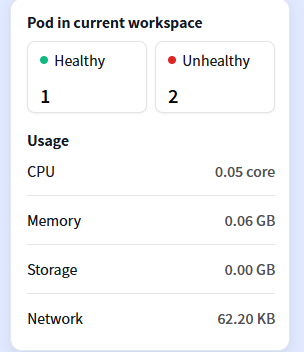
Additional Context:
These pods appear to be orphaned resources. According to community posts, this may be related to:
- Platform sync delays
- Orphaned pods not managed by any application
- Region-specific load issues
My concerns:
- Will these pods continue to incur charges?
- How can I force-delete them from the console?
- Does this affect my concurrent pod limits?
Please help clean up these orphaned pods from the backend. Thank you.